Best Stessa Alternatives for Real Estate Investors in 2026

If you need to replace Stessa, the right move depends on what’s actually missing from your workflow. Choose a banking-first bookkeeping platform (like Baselane) if you want property-level bank accounts with automated transaction rules and tax-ready Schedule E exports. Choose a full property-management suite (like Buildium, DoorLoop, Rentec Direct, Propertyware, or Rent Manager) if you need leasing, maintenance, and tenant portals alongside your financials. For lightweight tax automation on a small portfolio, a receipts-to-tax app handles most of the manual entry. And for deal analysis and forecasting, Real Estate Investor Toolkit fills the analytics gap that no bookkeeping platform fully covers.
Stessa was founded in 2016 and has since been acquired, with dozens of tools now positioning themselves as direct alternatives. The real question isn’t which app looks most like Stessa. It’s which one fits your actual workflow.
Quick shortlist by investor profile:
- Single-unit DIY landlord: Receipts-to-tax automation + a free ARV calculator for deal checks
- 2–10 door portfolio: Banking-first bookkeeping with property-level accounts and automated categorization
- Scaling to property manager (10–50 doors): Full property-management suite (leasing, maintenance, tenant portal, accounting)
- Syndicators or client-facing PMs: Enterprise property-management platform with trust accounting and API access
Start your evaluation by exporting your current Stessa data as a CSV, then run a one-property pilot import on your top candidate before committing to a full migration.
Key Takeaways
The best Stessa alternative is the one that matches your workflow: banking-first bookkeeping for clean books, a full PM suite for operational needs, and a dedicated analytics layer for deal decisions.
| Point | Details |
|---|---|
| Match tool to workflow, not price | Choose banking-first bookkeeping for tax-ready books; choose a full PM suite only when you need leasing and maintenance workflows. |
| Run a one-property pilot first | Import one property, reconcile two months, and verify your Schedule E export before migrating your full portfolio. |
| Decouple analytics from operations | Pair a bookkeeping or PM platform with a dedicated deal-analysis tool to keep acquisition math accurate. |
| Red flags to avoid | No CSV export, no property-level tagging, and opaque pricing are disqualifying traits in any candidate platform. |
| Real Estate Investor Toolkit for deal analysis | Use the free ARV, rehab, and rental cash flow calculators to validate forecast assumptions during any platform trial. |
Table of Contents
- How do the best Stessa alternatives compare side by side?
- Per-platform summaries: what each Stessa alternative actually does
- How do you choose the right Stessa alternative for your portfolio?
- When should you decouple financial analysis from property management?
- Which Stessa alternative should you try first?
- The part most investors get wrong about switching platforms
- Real Estate Investor Toolkit covers the analytics side of your migration
- Useful sources for migration docs and further reading
How do the best Stessa alternatives compare side by side?
The table below maps each platform category across the dimensions that matter most for real estate investors. Specific pricing tiers vary by vendor and portfolio size; free tiers and trial lengths are noted where they are commonly available across the category.
| Category | Best for | Core strengths | Pricing shape | Portfolio scale | Integrations / export | Tax-ready reporting | Ease of onboarding | Support |
|---|---|---|---|---|---|---|---|---|
| Banking-first bookkeeping (Baselane) | 1–20 door investors wanting automated books | Property-level banking, automated rules, rent collection, Schedule E export | Free tier available; paid tiers for advanced features | Single unit to ~50 doors | Bank sync, CSV export, QuickBooks-compatible | Strong: per-property P&L, Schedule E | Low learning curve; 1–2 hours setup | Email + chat |
| Full PM suite (Buildium, DoorLoop, Rentec Direct) | Landlords needing leasing + maintenance + accounting | Tenant portal, lease signing, maintenance tracking, owner statements | Starting prices from mid-range monthly fees; free trials common | 1 unit to enterprise | API access, Zapier, CSV/PDF export | Good: owner statements, general ledger | Moderate; around 4 hours onboarding | Phone, chat, knowledge base |
| Enterprise PM (Propertyware, Rent Manager) | Portfolio managers, syndicators, client-facing PMs | Trust accounting, custom reporting, open API, advanced workflows | Custom / per-unit pricing; demos required | Above 50 units | Full API, custom integrations | Excellent: trust accounting, audit trails | High; dedicated onboarding team | Dedicated account manager |
| Receipts-to-tax automation | Small landlords with 1–5 properties | Email receipt extraction, property tagging, Schedule E worksheet | Low monthly cost; often free tier for 1 property | 1–5 units | Email import, CSV export | Good for small portfolios | Very low; under 1 hour | Email / self-serve |
| DIY finance apps (Quicken Simplifi, etc.) | Investors who prioritize cash-flow projections | Account aggregation, bill tracking, projected cash flows | Low monthly subscription | 1–3 properties max | Bank sync, CSV export | Basic; not property-specific | Very low | Self-serve, community |
Banking-first bookkeeping pros/cons:
- ✅ Eliminates the need for a separate business bank account setup; property-level accounts keep transfers clean
- ✅ Automated transaction rules cut monthly reconciliation time significantly
- ⚠️ Operational features (maintenance, leasing) are limited or absent
Full PM suite pros/cons:
- ✅ One platform for leasing, maintenance, accounting, and tenant communication
- ✅ Owner portals and statements are built for client-facing PMs
- ⚠️ Monthly cost is higher; many features go unused for smaller portfolios
Receipts-to-tax automation pros/cons:
- ✅ Minimal manual entry; email-extracted receipts map directly to properties
- ✅ Outputs a Schedule E–ready worksheet with little configuration
- ⚠️ Scales poorly beyond five properties; no operational features
DIY finance apps pros/cons:
- ✅ Account aggregation connects to thousands of institutions for a consolidated transaction view
- ✅ Projected cash flows and custom reporting suit investors focused on forecasting
- ⚠️ Not built for property-level tagging; Schedule E output requires manual mapping
Per-platform summaries: what each Stessa alternative actually does
Baselane (banking-first bookkeeping)
Baselane centers its product on property-level banking: you open FDIC-insured accounts organized by property or entity, and transactions flow directly into automated bookkeeping rules. Rent collection, expense categorization, and a Schedule E export are all built in. A free tier covers basic features, with paid tiers unlocking advanced reporting and multi-entity support.
Best for: Investors with 1–20 doors who want clean books without a separate bank account setup. The property-level account structure is the standout feature; it removes the transfer-tracking headache that plagues investors using a single shared account.
Migration note: Export your Stessa transaction history as a CSV, map your property names to Baselane’s account labels, and reconcile two months before going live. Most users complete a single-property pilot in under two hours.
Pricing shape: Free tier available; paid features behind a monthly subscription.
Learning curve: Low. Most investors are operational within a day.
Buildium
Buildium is a full property-management suite built for landlords who need more than bookkeeping. Tenant portals, online lease signing, maintenance request tracking, and owner statements are all native. Accounting is solid but secondary to the operational layer.
Best for: Landlords managing 10–150 units who need leasing and maintenance workflows alongside financials. If your tenants are still emailing you maintenance requests, Buildium solves that immediately.
Pricing: Starts around $55/month for the Essential plan; a free trial is available. Per-unit pricing applies at higher tiers.
Migration note: Buildium accepts CSV imports for tenant and property data. Transaction history requires manual entry or a bookkeeper’s help for the first reconciliation period.
DoorLoop
DoorLoop positions itself as a modern, mobile-first PM platform with a clean interface and fast onboarding. It covers leases, maintenance, rent collection, and accounting, with Zapier integration for connecting third-party tools.
Best for: Tech-comfortable landlords scaling from 5 to 50 doors who want a polished interface and don’t need enterprise-level trust accounting. DoorLoop’s onboarding is notably faster than older PM platforms.
Pricing: Starts around $59/month; a free demo and trial are available.
Migration note: CSV import handles property and tenant data well. Plan two to four hours for a five-property migration.
Rentec Direct
Rentec Direct covers property management, tenant screening, online payments, and accounting in one platform, with a reputation for strong customer support and transparent pricing. It’s been a steady choice for independent landlords for over a decade.
Best for: Landlords who want a full-featured PM platform without enterprise pricing. Rentec’s phone support is a genuine differentiator for investors who prefer talking to a person.
Pricing: Starts around $45/month for Rentec PM; a free trial is available.
Migration note: CSV import for properties and tenants; transaction history migration is manual.
Propertyware
Propertyware targets single-family rental portfolios at scale, with open API access, custom workflows, and owner portals built for client-facing property managers. It’s more complex to configure than mid-market tools.
Best for: Property managers handling large single-family portfolios who need custom reporting and API integrations with other business systems.
Pricing: Per-unit pricing; a demo is required. Not cost-effective below 50 units.
Migration note: Dedicated onboarding support is included. Expect two to four weeks for a full portfolio migration.
Rent Manager
Rent Manager is an enterprise-grade platform with trust accounting, a full general ledger, and deep customization. It handles commercial and residential portfolios and has an open API for third-party integrations.
Best for: Syndicators, client-facing PMs, and mixed-use portfolio operators who need audit-ready financials and custom reporting.
Pricing: Per-unit pricing; contact for a quote. Free trial available.
Migration note: Rent Manager has a dedicated data migration team. Budget three to six weeks and consider a bookkeeper for the first reconciliation.
Receipts-to-tax automation (category)
These tools pull receipts from your email inbox, match them to properties, and produce a Schedule E–ready export. PCMag’s editors note that ease of use and automation are the defining traits of top-rated personal finance tools, and receipts-to-tax apps apply that logic specifically to landlord tax prep.
Best for: Landlords with one to five properties who spend too much time on manual entry and want a clean Schedule E without learning a full accounting platform.
Pricing shape: Low monthly cost; free tiers often cover one property.
Learning curve: Under one hour. The main discipline required is tagging each receipt to the correct property at capture.
Pro Tip: Tag every expense to a specific property the moment you capture it, not during monthly reconciliation. This single habit produces cleaner Schedule E exports than any software feature.
How do you choose the right Stessa alternative for your portfolio?
The decision comes down to workflow fit, not price. Analysts consistently note that investors who struggle with Stessa are usually hitting an operational ceiling, not a financial one. Before you demo anything, answer these four questions:
- Do you need tenant and maintenance workflows? If yes, go straight to a full PM suite. Bookkeeping tools won’t solve an operational problem.
- Do you have more than five properties? Below five, receipts-to-tax automation or a banking-first tool is usually enough. Above five, property-level banking or a PM suite pays for itself in time saved.
- Do you file Schedule E? Every tool on this list should produce a Schedule E export. Test it before you commit: request a sample export during the demo.
- Do you need API access or third-party integrations? If you’re connecting to a CRM, investor portal, or custom reporting tool, verify API availability before signing up.
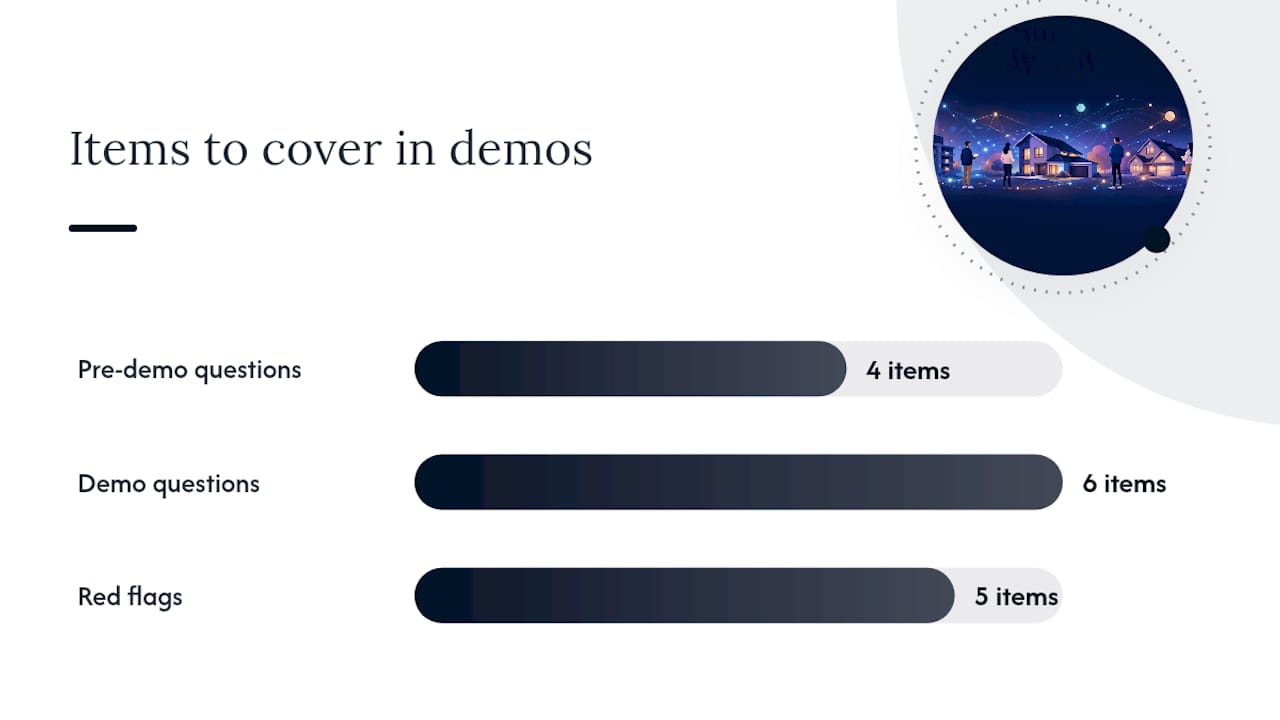
Questions to ask on every demo call:
- What file formats does your data export support (CSV, QBO, PDF)?
- Can I tag transactions at the property and entity level?
- Does your Schedule E export map to IRS categories automatically?
- What integrations do you support natively, and which require Zapier?
- Can I run a test import with my existing transaction history before committing?
- What happens to my data if I cancel?
Red flags to watch for:
- No CSV export or data portability guarantee
- No property-level transaction tagging
- No receipt capture or owner statements
- Pricing that requires a call to get a number
- No free trial or pilot import option
Migration timeline and cost estimates:
For a small property portfolio, a self-managed migration typically takes a few hours spread over several days to a couple of weeks. No consultant is usually needed if you follow a one-property pilot approach.
For larger property portfolios, expect the migration to take multiple weeks and require some professional bookkeeping support to reconcile initial transactions and verify category mapping. Services that combine software automation with human support can reduce the recurring admin burden during the transition period.
When should you decouple financial analysis from property management?
The short answer: when your portfolio needs exceed tax-ready bookkeeping and you require tenant or maintenance workflows, run separate tools for analytics and operations. Forcing a single platform to do both usually means it does neither well.
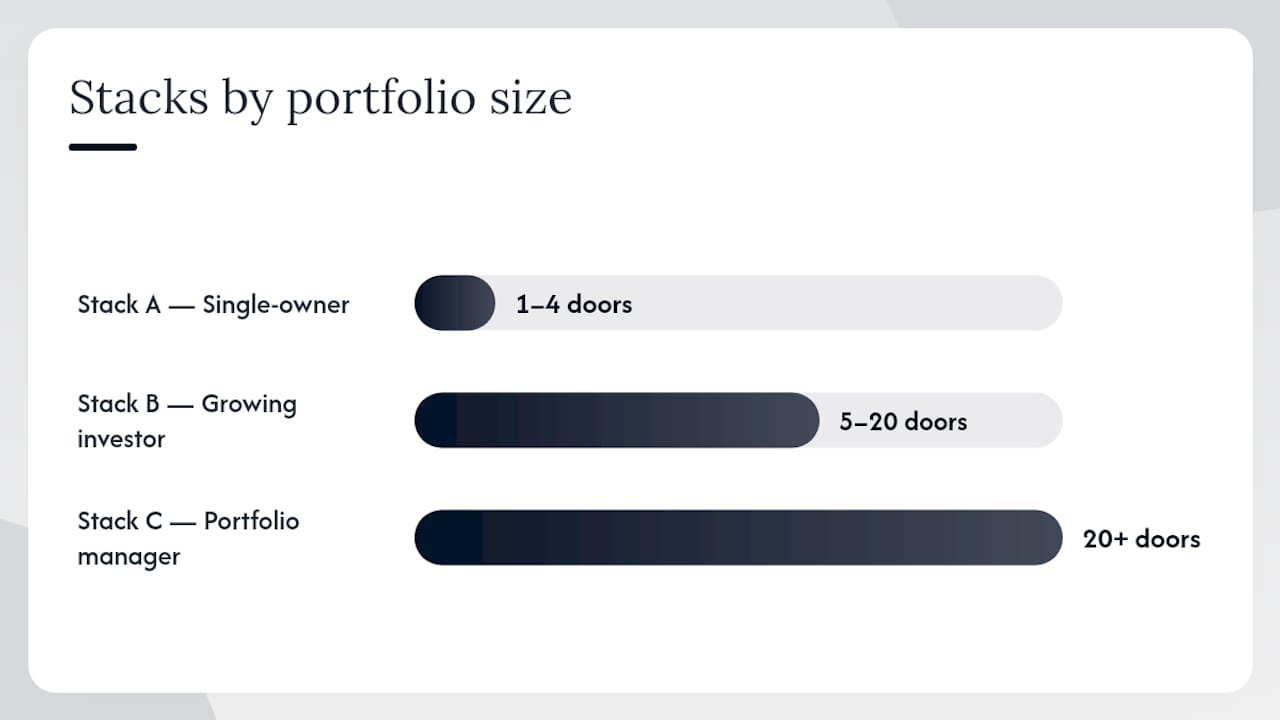
Here are three tech stacks that work in practice:
Stack A: Single-owner DIY (1–4 doors) Receipts-to-tax automation for bookkeeping + an ARV calculator for deal analysis. Total monthly cost is low; Schedule E is covered; deal math stays accurate.
Stack B: Growing investor (5–20 doors) Banking-first bookkeeping (property-level accounts, automated rules) + a lightweight deal-analysis toolkit for forecasting. This combination handles clean books and accurate acquisition math without the overhead of a full PM suite.
Stack C: Portfolio manager or client-facing PM (20+ doors) Full property-management suite (leasing, maintenance, trust accounting) + dedicated deal-analysis tools for new acquisitions. The PM platform handles day-to-day ops; the analytics layer handles acquisition decisions.
Migration checklist before switching any platform:
- Export all transaction history and documents from your current tool (CSV + PDF receipts)
- Map your property names and account IDs to the new platform’s structure
- Run a pilot import on one property and reconcile two full months of transactions
- Confirm your Schedule E export matches your prior-year figures
- Migrate remaining properties only after the pilot reconciles cleanly
Pro Tip: The most common migration failure is skipping the pilot reconciliation. One property, two months, full reconciliation. Catch mapping errors there, not after you’ve imported 20 units.
Use-case example: an investor separating deal analysis from bookkeeping typically finds that their acquisition math improves once they stop relying on a bookkeeping platform’s built-in projections, which don’t account for rehab costs or ARV variance. Running a rental cash flow check alongside your bookkeeping tool keeps your forecasts grounded in real deal data.
For a deeper look at how to analyze your first real estate deal before committing to a platform, the Real Estate Investor Toolkit learning hub walks through the full process step by step.
Which Stessa alternative should you try first?
By investor profile:
- Single-unit DIY landlord: — Start with a receipts-to-tax tool or Baselane’s free tier. Import one bank account, tag two months of expenses, and run a Schedule E export to verify accuracy.
- Scaling to property manager (10–50 doors): — Buildium or DoorLoop. Both have free trials and cover leasing + accounting in one platform.
- Enterprise / client-facing PM: — Propertyware or Rent Manager. Request a demo and a sample data migration before committing.
Trial action plan for your first week (30–90 minutes total):
Expected timeline: One property onboards in one to two days. A full portfolio migration for five properties typically takes one to two weeks with a self-managed approach. For 20+ units, budget three to four weeks.
The part most investors get wrong about switching platforms
Most investors who search for Stessa alternatives are solving the wrong problem. They assume a better platform will fix messy books. It won’t. The real issue is almost always process discipline, specifically, whether expenses are tagged to the correct property at the point of capture.
Software can automate categorization, but it can’t fix a transaction history where three properties share one bank account and receipts are filed under “miscellaneous.” Before you migrate anywhere, spend one hour cleaning up your tagging in your current tool. You’ll arrive at the new platform with data that actually works.
The other mistake is over-committing to features. A landlord with four properties does not need trust accounting, a tenant portal, and an open API. Those features cost money every month and add onboarding time. Start with the simplest tool that covers your actual workflow, and upgrade when you genuinely hit its ceiling.
One practical note on migration timing: don’t switch platforms mid-year if you’re within 90 days of tax season. The reconciliation work compounds when you’re also trying to close out a tax year. January is the cleanest time to migrate.
Real Estate Investor Toolkit covers the analytics side of your migration
When you move away from Stessa, the bookkeeping and ops platforms above handle your financials and tenant workflows. What they don’t replace is the deal-analysis layer: ARV estimation, rehab cost modeling, BRRRR scenario planning, and cash-flow validation on new acquisitions.
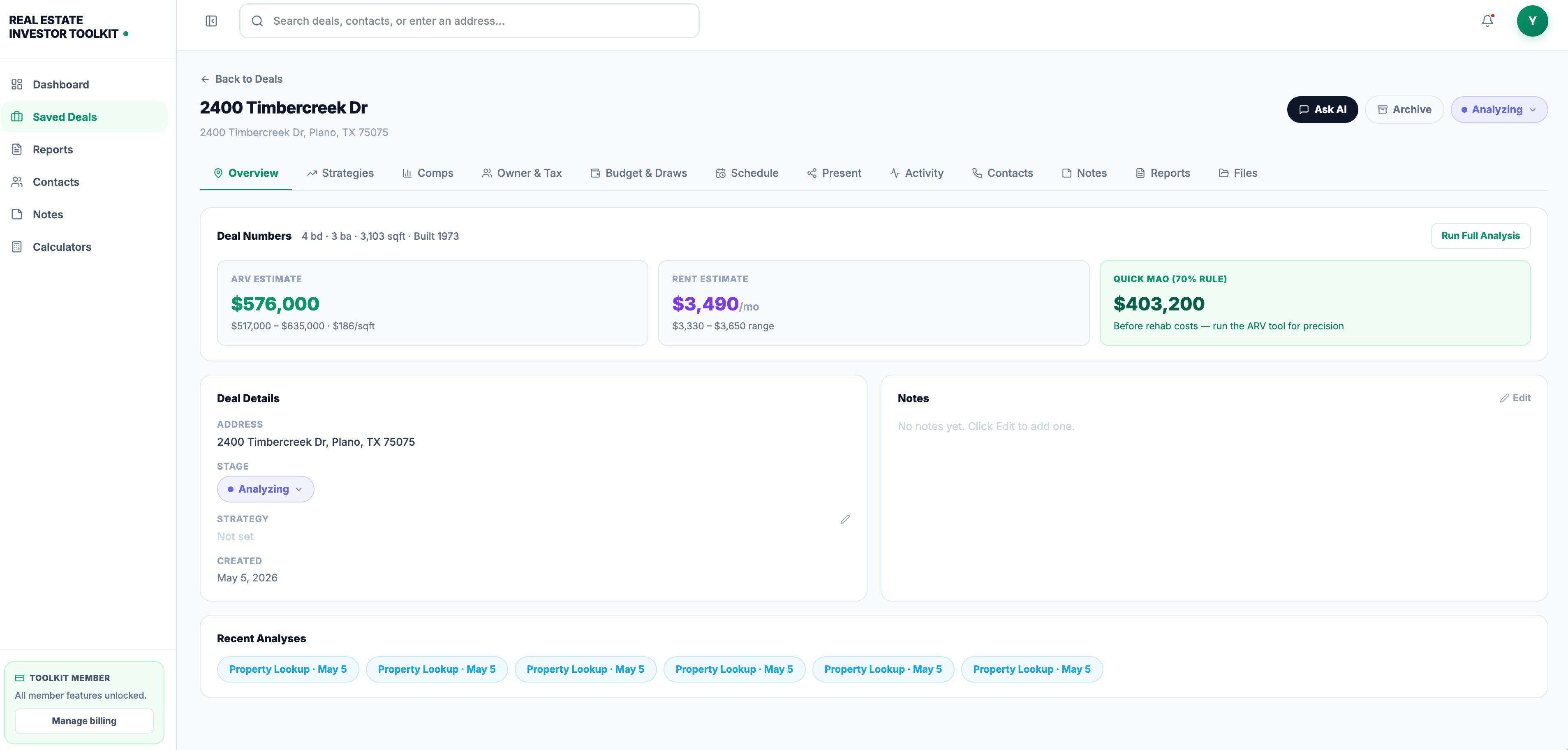
Real Estate Investor Toolkit fills that gap directly. The free ARV calculator and rehab cost estimator let you validate assumptions during any platform trial without signing up. The paid subscription unlocks saved deal pipelines, advanced property data, owner identification, and an AI assistant for deal vetting. During your migration trial, use the toolkit’s calculators to cross-check the projections your new bookkeeping platform generates. If the numbers don’t align, you’ll catch it before you commit.
Start with the free calculators at Real Estate Investor Toolkit and run your next acquisition through the deal pipeline before you finalize your platform choice.
Useful sources for migration docs and further reading
Stessa market context:
- Stessa company profile and competitor overview — Tracxn market database entry covering founding year, acquisition history, and competitor counts
Accounting and tax guidance:
- IRS Schedule E instructions — primary source for supplemental income and loss reporting on rental properties
- PCMag personal finance software reviews — editor-reviewed roundup of personal finance and account-aggregation tools, useful for evaluating lightweight alternatives
- Quicken Simplifi — cash-flow projection and account connectivity features relevant for small-portfolio forecasting
- Rocket Money — example of automation-plus-human-support model for recurring cost management during transitions
Real Estate Investor Toolkit resources (internal):
- How to analyze your first real estate deal — step-by-step guide for separating deal analysis from bookkeeping workflows
- DealFlow investor pipeline — saved reports and pipeline tracking that complement any bookkeeping platform
Partner reading:
- Top alternatives for rental marketplace platforms — useful context for investors evaluating listing and marketing workflows alongside accounting choices
This article is general information for educational purposes. Confirm current software pricing, tax rules, and data-portability terms directly with vendors and a qualified tax professional before making platform or filing decisions.