Comp Selection Criteria: The ARV & MAO Checklist

Use closed, recent, and highly similar sold transactions as your comps, never active or pending listings. That single rule sits at the center of every credible ARV estimate. The Appraisal Institute’s standards of professional practice treat active and pending listings as unreliable evidence of value, because a listing price is a seller’s opinion, not a buyer’s confirmed decision.
Beyond “sold only,” a comp needs to clear five filters before it earns a place in your analysis: proximity, recency, size, property type and bed/bath match, and condition. Miss any one of these, and your ARV drifts, which means your MAO drifts too. Real Estate Investor Toolkit’s calculators are built around this exact filter set, so the discipline you apply here plugs directly into your ARV and MAO math later.
- Sold status: Closed transactions only, verified against the MLS.
- Proximity: Same neighborhood, ideally within a half-mile.
- Recency: Sold within the last 90 days where possible.
- Size and layout: Comparable square footage, bed count, and bath count.
- Condition: Similar finish level, or adjusted if it isn’t.
Key Takeaways
A defensible ARV depends on selecting closed, recent, proximate, similarly sized, and condition-matched comps, then weighting the 3 to 5 best matches into a low, base, and high range.
| Point | Details |
|---|---|
| Closed sales only | Active and pending listings don’t qualify as valid ARV evidence under appraisal standards. |
| Five core filters | Match comps on proximity, recency, size, property type, and condition before accepting them. |
| Weight your best 3 to 5 | Build low, base, and high ARV cases instead of relying on a single comp or number. |
| Verify beyond the data | Street-view checks and deed verification catch issues raw records miss. |
| Use Real Estate Investor Toolkit | The comps analyzer and ARV/rehab calculators turn vetted comps into an MAO figure without manual spreadsheets. |
Table of Contents
- Quick Checklist: Must-Have Filters To Accept A Comp
- Step-By-Step Process To Build An ARV-Ready Comp Set
- How To Make Adjustments And Reconcile Conflicting Comps
- Worked Example: Comps To ARV To MAO
- Where To Get Sold Data And Red Flags To Avoid
- How Many Comps To Use And What Time Window Fits
- Assumptions, Limitations, And A Quick Disclaimer
- Author Perspective: Concise First-Person Notes
- How Real Estate Investor Toolkit Turns Comps Into A Number You Can Act On
- Sources
Quick Checklist: Must-Have Filters To Accept A Comp
Before you drop a sale into your comp set, run it through this field checklist. It works whether you’re sitting at a desk or standing in a driveway with your phone.
- Sold, not listed: Confirm closed status in the MLS, not “active” or “under contract.”
- Time window: Sold within 90 days in a normal market, longer only if inventory forces it.
- Distance radius: Within a half-mile to one mile, tighter in dense urban areas.
- Size range: Within roughly 10 to 15% of the subject’s square footage.
- Bed/bath match: Same bedroom count, bathroom count within one.
- Property type: Same style (single-family, townhome, condo) and similar lot size.
- Condition/finish level: Comparable renovation quality, or flagged for adjustment.
- Sale type: Arm’s length only, no foreclosures or short sales unless adjusted.
Each checkbox feeds a specific calculation. Recency affects how much you trend the sale price forward or backward. Condition feeds directly into your rehab cost estimate. Distance and size determine whether a sale belongs in your primary comp pool or gets demoted to secondary support.
Pro Tip: Before you accept any comp, pull up the address in Google Maps street view and scroll through the listing photos from the original sale. A house that looks identical on paper can sit on a busy corner lot or back up to a commercial property, and that kind of noise never shows up in the square footage field.

Step-By-Step Process To Build An ARV-Ready Comp Set
Selecting comps isn’t a single decision, it’s a five-step filtering and scoring process explained in What Is Property Comps? A Guide for Real Estate Investors. Skip a step and you’ll either overpay for a property or scare off a buyer with a bloated asking price.
- Pull raw sold data. Start in the MLS if you have access, or a paid provider. Set your initial filter to closed sales within the last six months and a one-mile radius.
- Filter by property type and physical bands. Narrow to the same property type, beds and baths within one, and square footage within roughly 10 to 15%. This usually cuts your raw pool from 15 to 20 sales down to 6 to 10 realistic candidates.
- Score and rank the survivors. Scoring comps on location, size and layout, condition, recency, and buyer appeal turns a gut-feel comparison into something you can defend to a lender. Rank each candidate from strongest match to weakest.
- Apply adjustments. Start with a per-square-foot baseline, then layer fixed-dollar adjustments for features the comp has that your subject doesn’t (or vice versa).
- Weight your top comps and build a range. A well-executed investor CMA produces low, base, and high valuation cases, weighting the 3 to 5 most closely matched comps more heavily than the rest.
For every comp that survives step 2, capture the same data fields so your worksheet stays consistent:
| Field | Why it matters |
|---|---|
| Address & sale date | Confirms recency and lets you verify recording delays |
| Sale price | The raw input before adjustments |
| Gross living area (GLA) | Drives your per-square-foot baseline |
| Beds / baths | Core matching criteria for buyer appeal |
| Lot size | Flags oversized or undersized outliers |
| Condition notes | Determines adjustment direction and size |
| Sale type | Screens out distressed sales unless adjusted |
Investor comp analysis differs from a listing agent’s CMA in one important way: you’re comparing to what a retail buyer would choose over your finished product, not simply the three closest sales by radius. A buyer cross-shopping a renovated 1,600-square-foot ranch doesn’t care that your subject is technically 0.3 miles closer to a comp than another house is. They care whether the kitchen, the layout, and the finish level compete on the same shelf.
Once you’ve adjusted and weighted your top comps, the roll-up is simple: multiply each comp’s adjusted price per square foot by your subject’s GLA, then apply your weighting to land on a single ARV figure, or better, a range.
How To Make Adjustments And Reconcile Conflicting Comps
Three adjustment methods cover almost every situation you’ll run into: a dollar-per-square-foot baseline for the core comparison, fixed-dollar feature adjustments for things like a garage, a pool, or an extra bathroom, and percentage adjustments for broader condition or quality differences that don’t map cleanly to a single line item.
The trickiest judgment call is deciding whether to adjust the comp or adjust your rehab budget. If your subject is a distressed property and your best comp already sold fully renovated, don’t inflate the comp’s price down. Instead, keep the comp’s sale price as your ARV target and make sure your rehab estimate genuinely closes the gap between “as-is” and “renovated.”
When comps disagree, and they often will, use these tactics:
- Drop the weakest match, even if it’s the highest sale, if it’s an outlier on size, condition, or location.
- Use a weighted average across your top 3 to 5 comps rather than a straight mean.
- Present a low, base, and high range instead of forcing a single number that overstates your confidence.
Pro Tip: Watch for confirmation bias. It’s tempting to anchor on the highest sale in your comp set because it makes the deal pencil, but a defensible ARV comes from the sales that match best, not the ones that make your offer look better.
Worked Example: Comps To ARV To MAO
Say you’re evaluating a 1,500-square-foot, 3-bed, 2-bath ranch. You pull three comps within a half-mile, all sold in the last 90 days:
- Comp A: $310,000, 1,480 sq ft, updated kitchen, no garage.
- Comp B: $295,000, 1,540 sq ft, dated finishes, attached garage.
- Comp C: $322,000, 1,510 sq ft, fully renovated, attached garage.
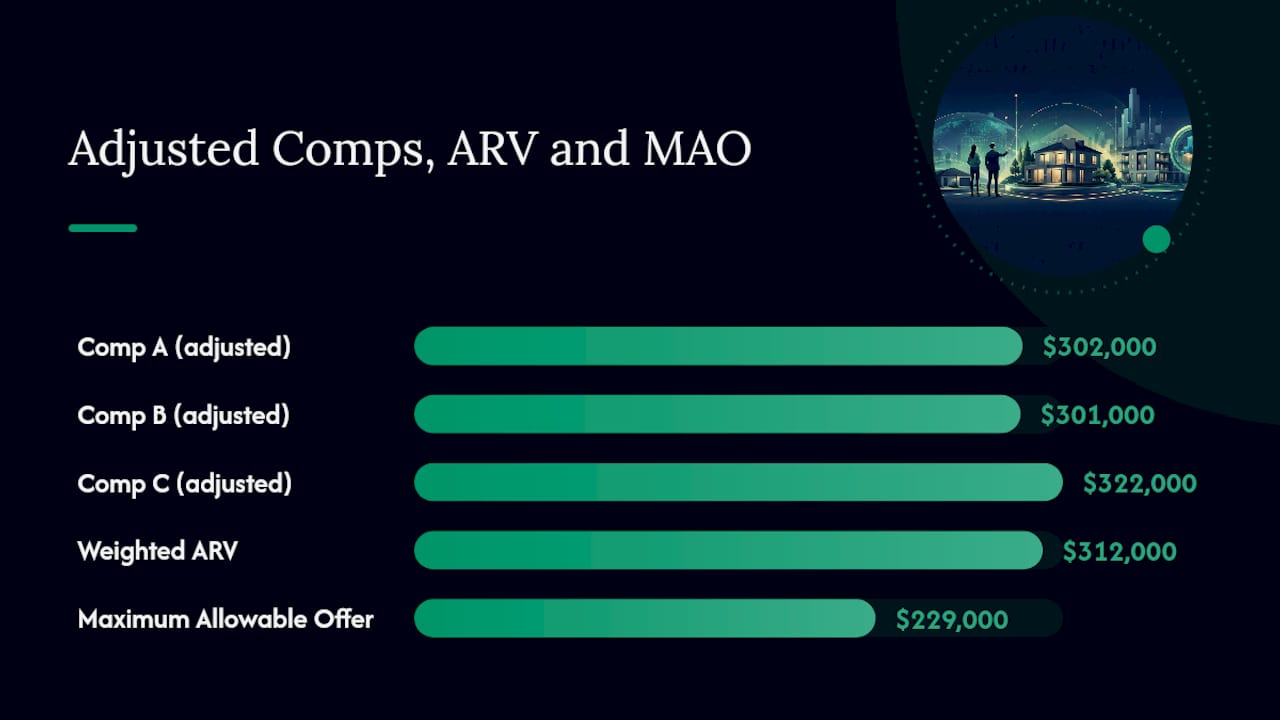
After adjusting Comp A down $8,000 for the missing garage, Comp B up $6,000 for its dated finishes, and Comp C left as your strongest match, you land on adjusted values of roughly $302,000, $301,000, and $322,000. Weighting Comp C most heavily because it’s the closest condition match gives you a base ARV around $312,000.
From there, the MAO formula takes over: ARV minus rehab costs, minus holding and selling costs, minus your target profit, equals your maximum allowable offer. If rehab runs $35,000, holding and selling costs run $18,000, and you want $30,000 in profit, your MAO lands near $229,000.
Pro Tip: Run your adjusted comps through the ARV calculator first, then feed that output straight into the MAO formula rather than recalculating by hand. Because ARV anchors every pricing decision downstream, a small comp error compounds fast.
Where To Get Sold Data And Red Flags To Avoid
The MLS remains the strongest source for closed sales because it captures accurate sale dates, concessions, and days on market. County property records and tax assessor data offer a free backup, especially useful for verifying square footage and confirming a deed transfer actually closed. Paid providers like CoreLogic and ATTOM aggregate sold data at scale and help when MLS access is limited or you’re evaluating markets outside your usual territory.
Consumer sites like Zillow or Redfin can work as a starting point, but their automated valuations lag behind actual closings and should always get cross-checked against MLS or county records before you trust them.
Watch for these red flags:
- Active or pending listings mixed into your comp pool.
- Distressed sales (foreclosure, short sale) without a corresponding price adjustment.
- A single outlier sale that skews your average upward or downward.
- Incomplete public records missing square footage or lot size.
- A recording date that trails the actual sale date by weeks or months.
Before finalizing any comp, check the deed type and confirm the sale date against the recording date, then do a quick street-view sanity check to catch condition issues that flat data can’t show.
How Many Comps To Use And What Time Window Fits
- Use 3 to 5 primary comps as your core valuation set, and pull 3 to 6 secondary comps for context and to catch trends the primary set might miss.
- If you can’t find at least 3 solid matches, treat your ARV as a wider range rather than a single number, and disclose that lower confidence to any lender or partner reviewing the deal.
- A half-mile radius and a 90-day window works as a practical starting default in most markets, stretching to 6 to 12 months in slower markets, but rarely past 12 months for a primary comp.
Pro Tip: Expand your radius or time window in small steps, a quarter-mile or 30 days at a time, and note exactly how far you had to stretch. That note becomes your own confidence flag the next time you revisit the deal.
Assumptions, Limitations, And A Quick Disclaimer
This workflow assumes clean sold data, accurate square footage records, and consistent condition definitions across comps. Real markets rarely hand you that cleanly.
- Thin inventory in rural or niche markets can leave you with fewer than 3 usable comps.
- Truly unique properties (a converted barn, a waterfront lot) often lack any close match.
- Rapid market shifts can make a 60-day-old comp feel stale before you even close.
- Appraisers retain discretion and may weight comps differently than your own analysis.
Your ARV estimate is a working number, not a guarantee. Validate it against underwriting requirements and, when the deal size warrants it, a licensed appraiser’s review before you commit capital.
Author Perspective: Concise First-Person Notes
I’ve watched more deals go sideways from sloppy comp selection than from bad renovation math. The habit that saves the most headaches: always save your top 3 comps in writing, with adjustment notes, and re-check active competition right before you list. Real Estate Investor Toolkit’s comps analyzer is where I run that check now, because it keeps the scoring consistent instead of relying on memory.
How Real Estate Investor Toolkit Turns Comps Into A Number You Can Act On
Screening comps by hand in a spreadsheet is where most ARV estimates quietly go wrong, a missed adjustment here, a stale sale date there. Real Estate Investor Toolkit’s Real Estate Comps Analyzer applies the same proximity, recency, size, and condition filters covered above, then scores and weights your results automatically.
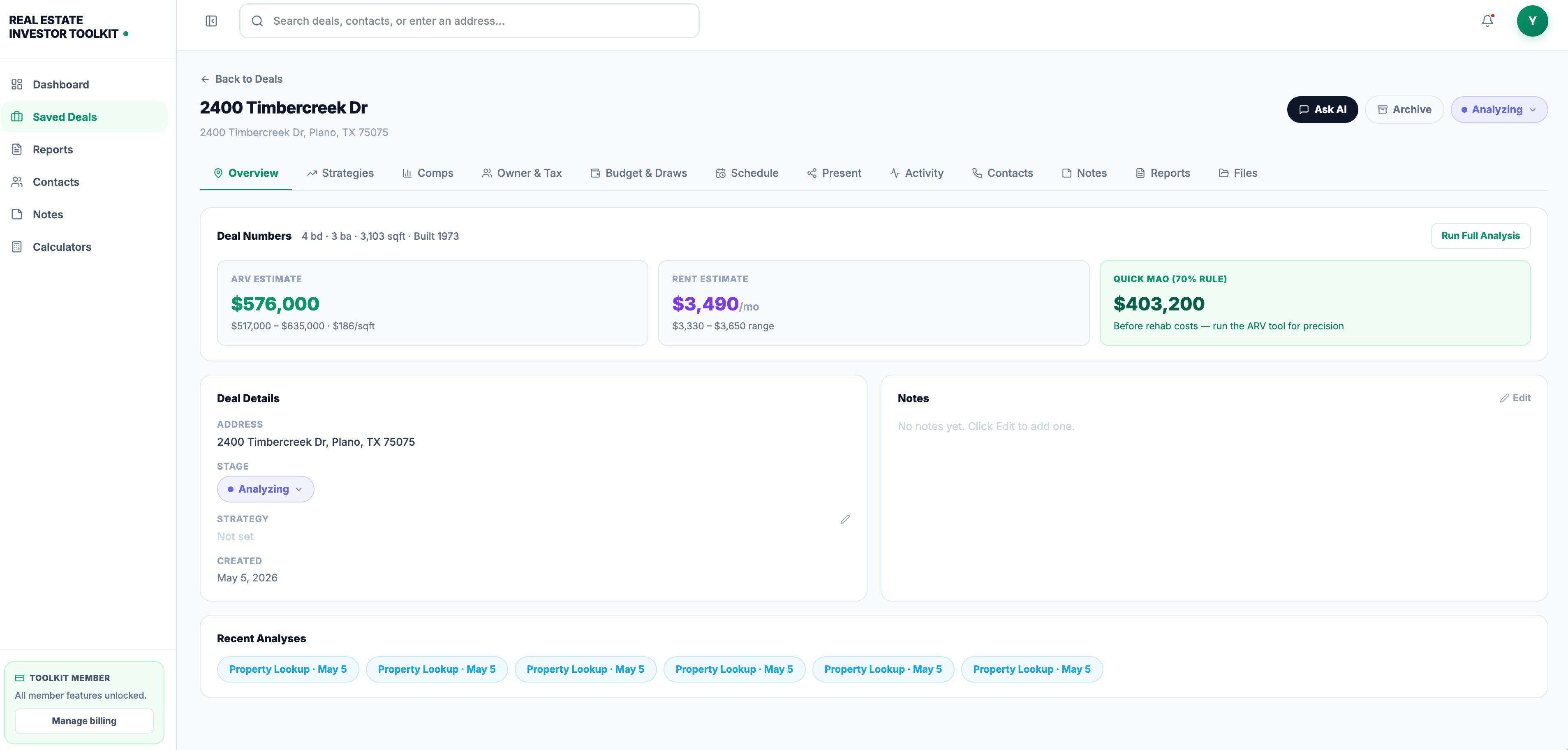
From there, the output flows straight into the ARV calculator and the Rehab Cost Calculator, so your comp-derived ARV and your rehab estimate land in the same MAO formula without any manual re-entry. Every calculator is free to run without an account, and if you’re managing multiple deals at once, a paid plan unlocks saved pipelines and advanced property data on top of the free tools. Start with the comps analyzer on your next prospective flip and see where your MAO lands before you submit an offer.
Sources
- How to Find Comps for Real Estate: Complete Guide 2026
- CMA for Real Estate Investors: How to Use Comps to Price Every Deal | ProPilot Blog
This article is general information, not a substitute for advice from a qualified financial advisor. Consult a qualified financial professional about your own circumstances before acting on anything here.
Recommended
- ARV Calculator — After Repair Value Estimator | Real Estate Investor Toolkit
- ARV vs MAO: What Changes Your Offer and What Just Measures Value — Real Estate Investing Guide | Real Estate Investor Toolkit
- Real Estate Investing Guides, Frameworks, and Strategies | Real Estate Investor Toolkit
- What Is MAO (Maximum Allowable Offer)? — Real Estate Investing Guide | Real Estate Investor Toolkit